Where Coach a Fighter Codes Drop
Find real promo codes fast ? and ignore fake verify pages.
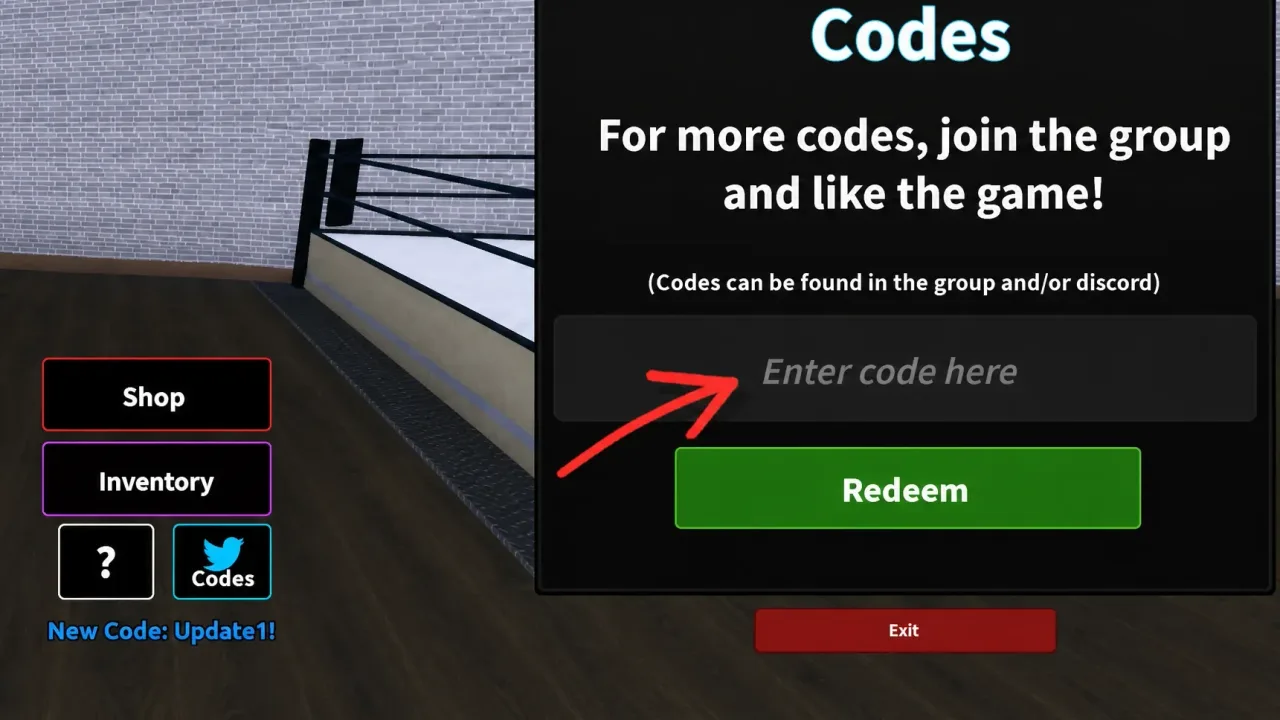
New Coach a Fighter codes usually appear around updates, milestones, and social announcements from the LockLoaded community. This page explains where to look first, how to verify a code is real, how to redeem safely after the tutorial, and how to stay clear of phishing pages that steal Roblox logins. Treat it as the announcement companion to the Codes hub, which keeps the live table of working strings.
As of the August 3, 2026 check, Update1! and Release! remain the working pair. No expired list yet. Always re-test in-game after patches because Early Beta can retire strings without a long farewell post.
Primary announcement channels
- Coach a Fighter / LockLoaded Discord ? codes often land in announcements or codes channels before fan sites mirror them.
- Roblox experience and group messaging ? description updates and group shout-outs sometimes include strings like Release! during launch windows. The official place is 111517697993641.
- Patch days and server restarts ? after Update-style drops, check the in-game Codes menu even if you missed Discord. Updates explains the Early Beta restart habit.
- This wiki’s Codes hub ? we refresh active and expired lists when community confirmation arrives from multiple sources, not from a single chat screenshot.
- Creator videos ? some YouTube uploads cover code waves; we only embed verified IDs inside related guides. Never trust a video description that links to a third-party login form.
Active codes snapshot (August 2026)
| Code | Rewards | Notes |
|---|---|---|
| Update1! | 25,000 Cash, 10 Real Rerolls, 5 Legend Rerolls | Larger bundle ? redeem first if you only claim one |
| Release! | 25,000 Cash, 10 Real Rerolls, 1 Legend Reroll | Still worth claiming; stacks with Update1! |
Combined totals and spend order live on Cash and rerolls. Redemption troubleshooting lives on How to redeem codes.
How to tell a real code from bait
Real codes:
- Redeem inside the game Codes UI after the tutorial
- Are short strings, often with punctuation like
! - Appear on multiple reputable trackers within hours
- Never require your Roblox password on an external site
Fake bait:
- Asks you to log in on a random website
- Demands friend invites or Discord DMs with “middlemen”
- Promises unlimited Legend Rerolls for watching ads outside Roblox
- Uses urgency copy like “only 50 claims left” with a suspicious link
If a stranger says a code only works through their link, close the tab. Bookmark this page and the Codes hub instead of searching “free Legend Reroll generator.”
Exact redemption path (so you do not miss drops)
- Launch Coach a Fighter on Roblox.
- Finish the tutorial ? the Codes button stays locked until then.
- Open Codes at the bottom-right (UI may shift slightly in Early Beta).
- Paste Update1! or Release! with no extra spaces.
- Confirm and check inventory for Cash plus Real / Legend Rerolls.
Mobile players should paste rather than retype. PC players can use Ctrl+V after focusing the field. Neither platform uses Roblox chat for redemption.
Best habit after every update
- Relaunch the experience and note UI changes.
- Open Codes and test known actives from the Codes hub.
- Skim Updates for patch context and server restart warnings.
- Spend new Cash through the How to earn Cash plan, not instant all-in bets ? see How to bet.
- Avoid Scripts rabbit holes; none are verified as of the August 2026 recheck.
Why codes matter more in Early Beta
Progress systems can shift, but free Cash and Rerolls compress the early grind. Missing a 24-hour code window can slow roster building more than a single lost NPC match. Codes also fund the gym upgrades that make every later training session cheaper in time ? How to upgrade your gym.
New coaches who skip codes then blame the meta usually skipped a free 50,000 Cash bundle. New coaches who claim codes and immediately all-in untrained fighters create a different problem ? Beginner mistakes covers that spiral.
What to do when a code fails
- Confirm tutorial completion and Codes button visibility.
- Re-copy the string including the required
!. - Remove trailing spaces and wrong capitalization.
- Check whether the account already claimed it.
- Wait for post-patch confirmation on this wiki before assuming a silent expire.
- Never “fix” by entering credentials on a third-party redeem site.
If both known actives fail for everyone after a LockLoaded announcement, we move them to an expired section on the Codes hub after multi-source confirmation.
Related pages
- Codes hub ? live active table
- How to redeem codes
- Cash and rerolls
- Beginner mistakes
- Getting started
- Scripts hub ? no verified automation; codes remain the clean boost
Stay close to official channels, redeem in-game only, and let the gym ? not a phishing form ? grow your fighters.
Frequently Asked Questions
Quick answers to the most common Coach a Fighter questions.
Where do Coach a Fighter codes appear first?
Usually in LockLoaded or game Discord announcements, then on the Roblox experience page and verified fan code lists.
Are Update1! and Release! still active?
As of the August 3, 2026 check, both remain listed as working. Always re-test in-game after patches.
Can I redeem codes on a website?
No. Use the in-game Codes button after the tutorial. Website forms asking for your password are scams.
What if a code stops working?
It may be expired, already claimed, or mistyped. Check the Codes hub and remove extra spaces including the required !
Do I need Discord to get codes?
Discord is often first, but you can still catch verified strings on this wiki's Codes hub and the Roblox page after they spread.